
Choosing the right POS system for your supermarket or hypermarket is one of the most important decisions you will make for your retail business.
Large-format retail stores deal with high footfall, fast-moving SKUs, multiple billing counters, and complex inventory.
A powerful POS system helps you run operations smoothly, reduce errors, improve billing speed, and scale your business easily.
This blog explains exactly what to look for in a supermarket or hypermarket POS system, backed by industry best practices and SEO-friendly insights.
1. Why Choosing the Right POS System Matters
Supermarkets and hypermarkets handle massive SKU volume, long customer queues, varied pricing structures, multiple payment modes, and fast inventory turnover.
A basic POS system cannot keep up with these demands.
With the right POS system, you can:
- Speed up checkout
- Reduce manual errors
- Track stock in real time
- Prevent stockouts
- Automate purchasing
- Improve customer satisfaction
- Increase profit margins
A modern POS system becomes the central brain of your entire retail operation.
2. Essential Features You Need in a Supermarket or Hypermarket POS
2.1 Fast Billing and Efficient Checkout
Supermarkets and hypermarkets require high-speed billing. Your POS must support:- Barcode and PLU code billing
- Weighing scale integration
- Quick item search
- Multiple payment methods
- Hold and recall bill
- Bill splitting
- Shortcut keys for fast checkout
2.2 Real-Time Inventory Management
Inventory management is the heart of large-format retail. Your POS should offer:- Real-time stock sync
- Automatic stock deduction
- Low stock alerts
- Expiry and batch tracking
- Shelf refill alerts
- Stock audits
- Centralized inventory for all branches
2.3 Offline Billing
Billing should continue even when internet connectivity drops. Offline billing ensures uninterrupted operations during peak hours.2.4 Supplier and Purchase Management
Supermarkets work with multiple vendors. Your POS should help manage:- Automated purchase orders
- GRN
- Rate lists
- Vendor comparison
- Purchase tracking
- Expiry-based replenishment
2.5 Multi-Store and Centralized Management
If you manage multiple supermarkets or a hypermarket chain, the POS must support:- Centralized pricing
- Centralized reporting
- Centralized discounts
- Role-based access
- Store-wise performance tracking
2.6 GST and Compliance Features
Your POS must handle:- GST invoicing
- HSN codes
- E-invoice
- E-way bill
- Tax reports
- GSTR summaries
2.7 Reporting and Analytics
A supermarket or hypermarket needs clear insights to make decisions. Look for:- Daily and monthly sales
- Item-wise sales performance
- Category-level performance
- Profit reports
- Dead stock reports
- Staff productivity
- Cost and margin analysis
2.8 Loyalty Programs and Promotions
Retail loyalty increases repeat visits. Your POS should support:- Loyalty points
- Membership programs
- Digital coupons
- Targeted discounts
- Buy-one-get-one offers
2.9 Mobile POS and Handheld Billing
Handheld POS helps manage:- Queue busting
- Shelf billing
- Stock checking
- Express counters
2.10 Third-Party Integrations
Your POS should integrate with:- E-commerce platforms
- Delivery partners
- ERP systems
- Payment gateways
- Accounting systems
3. POS System Comparison
| Feature | Basic POS | Advanced RetailPOS (Recommended) |
|---|---|---|
| Billing Speed | Standard | High-speed checkout suitable for supermarkets and hypermarkets |
| Inventory Sync | Manual | Real-time automatic sync |
| Offline Billing | Limited | Full offline support |
| Multi-Store Support | Not available | Centralized control for all branches |
| Automated Purchasing | Not available | Auto PO, GRN, vendor management |
| Expiry Tracking | No | Yes |
| Integrations | Limited | ERP, e-commerce, and payment integrations |
| Mobile POS | No | Available |
| Reporting | Basic reports | Advanced BI and analytics |
| Loyalty System | Very limited | Full loyalty and promotions module |
4. How to Choose the Right POS for Supermarkets and Hypermarkets
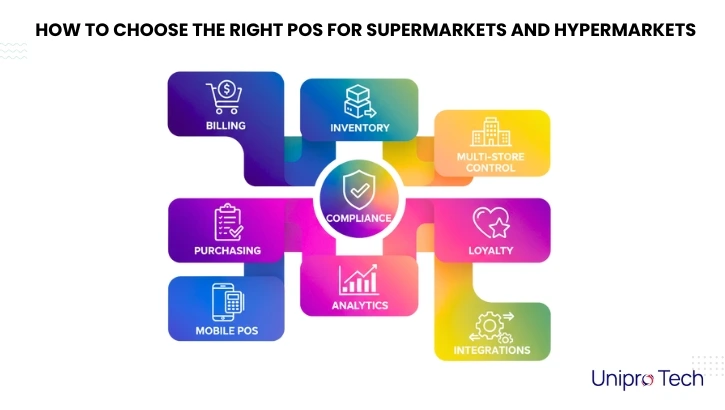
Sections for infographic:
- Billing
- Inventory
- Purchasing
- Multi-store control
- Compliance
- Analytics
- Loyalty
- Mobile POS
- Integrations
Visual style recommendation:
Clean layout, block-based design, soft colors, modern fonts.
5. Why Unipro Tech RetailPOS Is Ideal for Supermarkets and Hypermarkets
Unipro Tech’s RetailPOS solution is designed for large-format retail and offers:
- High-speed billing
- Real-time inventory
- Multi-store management
- Automated purchasing
- Batch and expiry tracking
- GST and e-invoice
- Mobile POS
- Full offline billing
- Smart dashboards and analytics
- Seamless integrations
It is perfect for supermarkets, hypermarkets, grocery chains, FMCG stores, and convenience stores.
6. Conclusion
Choosing the right POS system can transform your supermarket or hypermarket operations.
Focus on features that improve billing, inventory, reporting, and purchasing.
A modern POS helps you scale, manage branches efficiently, and enhance customer experience.
Frequently Asked Questions
Supermarkets and hypermarkets need a POS with fast billing, real-time inventory, offline support, and multi-store management. A system like RetailPOS with advanced analytics, purchase automation, and GST compliance is ideal for large retail formats.
Choose a POS that offers fast checkout, barcode and weighing scale support, centralized inventory, automated purchasing, GST billing, offline mode, and integrations with ERP, e-commerce, and payment gateways. These features ensure smooth supermarket operations.
A hypermarket POS must provide high-speed billing, multi-counter support, category-level inventory tracking, expiry and batch management, vendor management, and advanced reporting. Mobile POS and multi-store control are crucial for large-format retail.
POS pricing varies based on features like billing modules, inventory management, integrations, and number of stores. Most supermarket POS systems use subscription-based licensing. It’s best to request a demo and pricing quote to understand your store’s exact requirements.
Yes. Modern retail POS software provides real-time inventory tracking, low-stock alerts, automated purchase orders, stock transfers, audits, and expiry tracking — all essential for high-volume retail like supermarkets and hypermarkets.
Yes. A good POS system offers centralized pricing, centralized inventory, combined reporting, role-based access, and branch-wise performance insights. This helps multi-store supermarkets and hypermarkets scale efficiently.