Unipro Tech Solution

Latest

Best Inventory Management Software for Retail in 2026
Best Inventory Management Software for Retail in 2026

Retail in 2026 is no longer about just selling products. It is about managing inventory with precision, speed, and intelligence. Stock is now the backbone of every successful retail business. The stores that win are the ones that know exactly what to stock, when to stock, and how much to stock.

This is why choosing the best inventory management software for retail in 2026 has become one of the most important business decisions for supermarket owners, grocery store managers, mini marts, and retail chains.

With real time data, AI powered forecasts, and cloud based visibility, modern inventory software is replacing manual stock control methods and outdated systems.

This guide explains what to look for, what features really matter, and how smart inventory software can transform your retail business in 2026.

1. Why Inventory Management Is Critical in 2026

In retail, every unsold product is locked money and every out of stock product is a lost sale. Poor inventory control leads to overstocking, wastage, expired goods, missing items, and cash flow problems.

In 2026, customer expectations are higher than ever. They expect products to be available at all times. One stockout is enough for them to move to a competitor. At the same time, rising costs mean retailers cannot afford excess stock sitting on shelves.

A modern inventory management system helps businesses maintain the perfect balance between demand and supply.

2. Challenges Faced by Retail Businesses Without Smart Inventory

Many retail stores still rely on spreadsheets, manual stock registers, or outdated billing systems. This creates serious challenges such as:

  • Inaccurate stock levels
  • Over ordering or under ordering of products
  • No visibility into slow moving items
  •  Inability to track expiry and batch data
  • Poor coordination between branches
  • Time wasted on manual stock counting
  •  Increased risk of theft and shrinkage 

These challenges directly affect profitability and growth.

3. What Makes an Inventory Management Software the Best

The best inventory management software for retail in 2026 is not just a stock counter. It is a smart system that can think, learn, and guide decisions.

A powerful system should be able to:

  • Automatically update stock in real time
  • Sync across multiple branches
  • Predict demand based on sales trends
  •  Set minimum and maximum stock levels
  • Handle purchase planning
  • Integrate with billing and POS systems
  • Provide live reports and alerts 

Only a cloud based and AI enabled system can do all of this efficiently.

4. Key Features Every Retail Inventory System Must Have

A modern retail inventory management software must include:

  • Real time stock tracking
  • Barcode and QR code scanning
  • Batch and expiry management
  • Supplier and purchase order management
  •  Multi store and multi warehouse support
  • Automatic low stock and overstock alerts
  • Integration with POS and billing system
  • Cloud access from web and mobile
  • Smart reports and dashboards
  • AI based demand forecasting

Without these features, a system cannot support a growing retail business in 2026.

5. Manual vs Smart Inventory Management

AreaManual Inventory SystemSmart Inventory Software
Stock updatesSlow and error proneReal time and automatic
AccuracyLowNear perfect
Time takenVery highFully automated
Multi store managementDifficultEasy and centralised
Demand predictionNot possibleAI based prediction
Expiry trackingManualAutomatic
ReportingLimitedDetailed and real time
ScalabilityPoorExcellent

6. Benefits of Cloud Based Inventory Management for Retail

Cloud based inventory systems give retailers full control from anywhere, on any device.

Main benefits include:

  • Centralised data access
  • Real time updates from all branches
  • Automatic data backup
  • No need for physical servers
  • Easy upgrades and maintenance
  • Better collaboration between stores
  •  Faster business decisions 

For retailers planning to scale, cloud is no longer optional. It is essential.

7. How AI Improves Inventory Decisions in 2026

AI transforms inventory from a reactive process into a predictive one.

AI powered systems can:

  • Forecast future demand
  •  Identify seasonal trends
  • Detect slow moving or dead stock
  • Suggest optimal reorder quantities
  • Recommend discounts to clear overstock
  • Monitor competitor pricing impact
  • Reduce wastage and losses
  • Maximise profit margins

This level of intelligence was impossible just a few years ago. In 2026, it is becoming a necessity.

8. How to Choose the Right Inventory Software for Your Store

Before selecting an inventory system, ask the following questions:

  • Does it support your business type (supermarket, grocery, mini mart, retail chain)?
  • Is it cloud based and scalable?
  • Does it integrate with POS and billing?
  • Can it handle multiple branches?
  • Does it offer AI and smart analytics?
  • Is local support available?
  • Is the pricing transparent and flexible?

A system that answers yes to all these questions is the right investment for long term success.

9. Why Uniprotech Is the Ideal Solution for Modern Retail

Uniprotech delivers a powerful inventory management and POS platform designed specifically for retail businesses.

With Uniprotech you get:

  • Cloud based POS and inventory solution
  • Smart inventory predictions
  • Multi store and warehouse control
  •  Batch and expiry management
  •  Supplier invoice OCR
  • Automated purchase order generation
  • AI based promotions and pricing
  • Real time dashboard and reporting
  • Seamless integration with RetailPOS, UniMini, and enterprise systems

It is built to help retail businesses reduce loss, improve efficiency, and scale without limits.

10. Best Inventory Management Software for Retail in 2026

ProblemsSmart SolutionsResults
Overstock
Stockouts
Wastage
Manual errors
No visibility
Real time tracking
AI demand prediction
Auto purchase order
Cloud access
Multi store control
Higher sales
Lower losses
Accurate forecasting
Better margins
Smarter retail growth

Unipro Tech Solutions

Smart POS and cloud systems for supermarkets and hypermarkets

Website:www.uniprotech.co.in
Phone:044-421 421 40

Email:salesenquiry@uniprotech.co.in

Frequently Asked Auestions

 It is a system that tracks, controls, and manages stock levels in real time.

Yes, it uses secure servers and automatic backups.

Yes, it is ideal for both small and large retail businesses.

Yes, modern systems integrate with POS and GST billing.

Yes, it helps predict demand and reduce wastage.

Most stores can start within a few days.
Best Inventory Management Software for Retail in 2026 Read More »
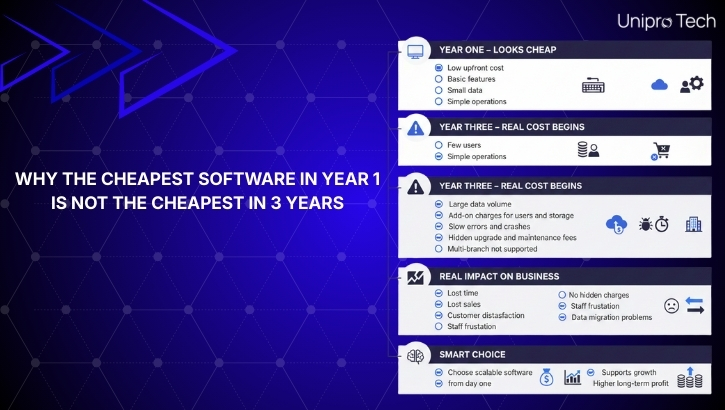
Why the Low-Priced Software in Year 1 Is Not the Low-Priced in 3 Years

Why the Cheapest Software in Year 1 Is Not the Cheapest in 3 Years

Many business owners select software by looking only at the initial price. If one system is Low-Priced in Year 1, it feels like the smartest decision. But in reality, the Low-Priced software in the beginning often becomes the most expensive mistake over time.

As your business grows, your operations become more complex. You handle more customers, more products, more transactions, and more data. If your software cannot grow with you, it will start to slow you down, create errors, and limit your potential.

Growth requires speed, scalability, automation, and intelligence. A system that cannot support your future will slowly drain your time, money, and energy. Short-term savings can quickly turn into long-term losses.

This blog explains why choosing software only based on price is risky and how to make a smarter decision for your business future.

1. Why Businesses Choose the Low-Priced Option in Year 1

When a business is new, the main focus is on minimizing expenses. Rent, staff salaries, stock, and basic operations demand most of the budget. Software is often viewed as just another cost, not an investment.

Many business owners choose the Low-Priced option because of:

  • A limited starting budget
  • Pressure to reduce initial costs
  • Focus on only basic requirements
  • Attractive low price offers
  • Lack of long-term planning
  • Limited understanding of future scale

In a small and simple setup, basic software seems to work. But that is only because the business itself is still small.

2. How Your Business Changes Over Three Years

A successful business does not stay small. It expands in different ways.

Within three years, businesses usually experience:

  • Higher customer footfall
  • More transactions every day
  • A wider range of products or services
  • Larger inventory volumes
  • More staff and system users
  • Multiple counters or branches
  • Increased demand for reports and analytics
  • Need for automation and faster operations

The same system that worked in Year 1 starts to struggle in Year 3. Speed slows down, errors increase, and important features are missing.

3. The Hidden Costs and Add On Charges of Low-Priced Software

The real cost of software is not the price you pay at the beginning. It is the cost you keep paying over time.

Low-Priced software often looks affordable only because many essential features are locked behind extra charges or limitations.

Hidden costs include:

  • Slow performance as data grows
  • System crashes and errors
  • Limited storage and user access
  • Manual work that increases staff dependency
  • Inventory mismatches and stock errors
  • Slow billing that causes customer frustration
  • Lack of detailed reporting for decision making
  • Costs involved in switching software later

On top of this, many providers add additional charges that are not clearly mentioned at the start:

  •  Charges for additional billing counters
  • Extra fees for each new user or staff login
  • Costs for inventory modules or advanced reports
  • Cloud storage limits and extra storage fees
  • Charges for multi-branch and warehouse support
  • Integration fees for barcode scanners, printers and weighing scales
  • Monthly or yearly maintenance and AMC charges
  • Fees for upgrades and new software versions
  • Extra costs for backup and data recovery

Over three years, these small charges keep adding up. What looked like a Low-Priced solution in Year 1 often becomes more expensive than a complete, scalable system that included everything from the beginning.

The real question should never be
How Low-Priced is this software today?

Instead, it should be
How much will this software really cost me in three years when my business has grown?

Hidden charges not only damage your budget. They also create confusion, mistrust, and long-term dependency on a system that constantly demands more money just to perform basic tasks.

A truly scalable system offers transparent pricing, clear features, and the ability to grow without unpleasant surprises.

4. Low-Priced Software vs Scalable Software

FactorLow-Priced SoftwareScalable Smart Software
Initial costLowModerate
Cost after three yearsVery highControlled
Handles business growthPoorExcellent
Performance over timeDecreasesStable and fast
Inventory accuracyWeakHighly accurate
Multi-branch supportNot availableFully supported
Reporting and insightsBasicAdvanced and real time
AutomationNot availableAI and automated
Long term valueLowVery high

5. Why Scalability Is Critical for Retail and Service Businesses

Retail stores, supermarkets, restaurants, and service businesses rely on speed and accuracy to stay competitive.

Your software must be able to support:

  • High transaction volumes
  • Real-time inventory control
  • Multiple counters and locations
  • Remote monitoring and reporting
  • Automation and smart features
  • AI-driven forecasting and analysis

If your system cannot handle growth, your business will be limited by technology instead of market demand.

6. How Smart Software Supports Long-Term Growth

A scalable and intelligent system supports your business at every stage of growth.

It provides:

  •  Fast and smooth billing even at high volumes
  • Real-time inventory tracking and control
  • Automated purchasing and stock planning
  • Detailed analytics and reporting
  • Centralised management for multiple locations
  • Better coordination between staff and management
  • Improved customer experience
  • More control over profit and expenses

Instead of creating problems, your software becomes a powerful growth engine.

7. The Real Business Risk Nobody Talks About: Being Locked In or Left Behind

One of the biggest dangers of choosing Low-Priced software is not just financial. It is the risk of being stuck with a system that cannot progress while your competitors move forward.

Many low-cost systems come with serious limitations such as:

  • No proper data export options
  • Closed systems with no integrations
  • Outdated technology
  • No regular updates
  • Weak customer support
  • Poor backup and data security

When your business grows and you realise the system is holding you back, switching becomes risky and expensive. Sales data, customer information, stock records, and reports can be lost during migration. Training staff again and reconfiguring workflows also consumes time and money.

At the same time, competitors who invested in scalable systems are already:

  • Opening new outlets
  • Using AI-powered insights
  • Reducing operating costs
  • Improving customer experience
  • Expanding into new markets
  • Adopting online and omnichannel models

The real cost of Low-Priced software is not just money. It is lost time, lost opportunities, and lost market position.

Choosing the right system is not just a technical decision. It is a strategic decision that shapes your future.

8. Choosing the Right System for the Future

When selecting software for your business, do not ask only one question.

How much does it cost today?

Instead, ask:

  • Can this system support me in three year
  • Will it handle more data and more customers
  • Can it manage multiple locations
  • Does it offer automation and intelligence
  • Will it reduce my workload
  • Does it give clear business insights

A scalable system protects your business from frequent disruptions, costly migrations, and unnecessary stress.

It allows you to focus on growth instead of constantly fixing system problems.

9. Why Low-Priced Software Fails Growing Businesses

Cheap Software vs Scalable Software

Call to Action – With Book Demo

Choose Growth Over Short-Term Savings

Do not let low-cost software limit your business expansion. Upgrade to a scalable POS and inventory solution built for long-term success.

Book a Demo: https://retailpos.co.in
Email: salesenquiry@uniprotech.co.in

Frequently Asked Auestions

Not always, but it is usually designed for very small or temporary use and not for growing businesses.

If you experience slow speed, data errors, reporting issues, or plan to expand, it is time to upgrade.

 The initial investment may be higher, but the long-term cost is far lower and more profitable.

It allows your system to grow with your business without needing replacement every few years.

Yes. Many low-cost solutions charge extra for essential features such as additional users, extra branches, more storage, advanced reports, upgrades, and integrations.

Choosing based only on price instead of long-term value and performance.

Smart POS and Cloud Systems for Supermarkets and Hypermarkets

Why the Low-Priced Software in Year 1 Is Not the Low-Priced in 3 Years Read More »

Is Your Store AI Ready? 7 Symptoms of an Outdated Retail System (2026 Guide)

Is Your Store AI Ready 7 Symptoms of an Outdated Retail System (2026 Guide)

Retail in 2026 is no longer just about having a billing system. It is about speed, accuracy, automation and intelligence. Customers now expect faster checkouts, real time stock availability, smooth digital payments and personalized shopping experiences. If your store is still using an outdated system or manual processes, you are not just slowing down your operations, you are losing revenue every single day.

This guide will help you understand whether your retail system is outdated and how AI powered POS and inventory solutions can prepare your business for the future.

1. What It Means to Be AI Ready in Retail

Being AI ready means your store is supported by smart, connected and automated technology that can predict demand, control inventory in real time, speed up billing, analyze data and reduce human errors. An AI ready retail system combines POS software, inventory management, analytics and automation into one intelligent system. This allows you to make data driven decisions and respond quickly to changing customer behaviour and market trends.

2. Why Outdated Retail Systems Cost You Money

Traditional retail systems or manual methods often lead to slow billing and long queues, incorrect stock levels, expired products, overstocking and shrinkage. These systems do not provide real time reports or useful insights, making it difficult for retailers to understand which products are performing well and which ones are causing losses.

An outdated system limits your ability to scale, reduce errors and increase profitability. Over time, it creates operational confusion and impacts customer trust.

3. Seven Symptoms of an Outdated Retail System

If your store experiences one or more of these problems, your current system needs an upgrade.

Billing is slow during peak hours
Your store struggles to handle heavy customer traffic, which results in long queues and lost sales.

Stock runs out frequently or builds up unnecessarily
You do not have accurate real time stock visibility or demand forecasting.

Inventory is managed manually
Manual stock updates increase the risk of errors and consume valuable staff time.

There are no real time business insights
You are unable to track daily sales, profit margins and product performance instantly.

Price changes and discounts are difficult to manage
Manual price updates cause confusion and pricing mistakes.

Managing multiple stores is complicated
There is no centralised dashboard to monitor and control all locations.

There is no AI or automation
Your system cannot predict demand, suggest purchase orders or recommend promotions.

If these issues sound familiar, your store is not AI ready yet.

4. How AI Powered Retail Systems Solve These Problems

AI powered retail systems address these challenges with smart automation and real time intelligence.

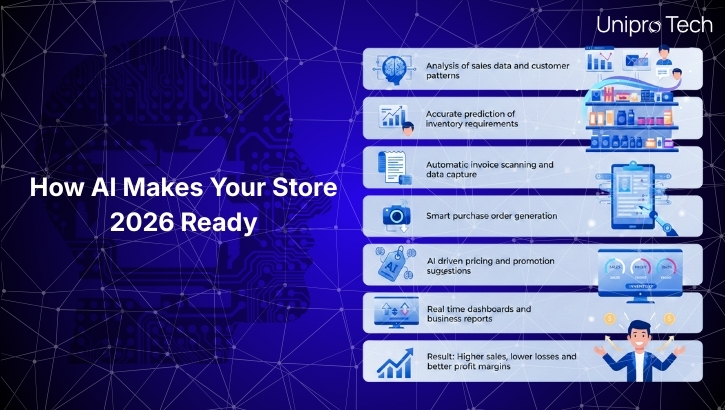
They analyse sales trends to forecast demand accurately. Inventory levels are updated in real time to avoid stockouts and overstock. Invoice scanning reduces manual data entry. Automated purchase order creation ensures the right stock is ordered at the right time. Pricing analysis helps businesses remain competitive while maintaining profit margins. AI powered dashboards provide clear visibility into daily operations and performance.

These capabilities transform your store into a smart, efficient and data driven business environment.

5.Traditional vs AI Powered Retail System

FeatureTraditional Retail SystemAI Powered Retail System
Billing speedSlowExtremely fast
Inventory trackingInaccurate or manualReal time and automated
Demand predictionNot availableAI based forecasting
Error rateHighVery low
Multi store supportLimitedAdvanced and centralised
ReportingBasicIntelligent and detailed
Profit optimisationNot supportedAI driven
ScalabilityLowHigh
Customer experienceAverageExcellent

6. Benefits of Upgrading to an AI Based Retail System

Upgrading to an AI based retail system improves checkout speed, ensures accurate inventory, reduces wastage, improves pricing decisions and increases profit margins. It enables better planning, prevents losses and helps deliver a superior customer experience.

By switching to an AI ready system, retailers gain better control, efficiency and the ability to grow their business with confidence.

7. Why Unipro Tech Is the Right Choice

Unipro Tech offers a complete ecosystem of retail solutions designed for modern businesses.

RetailPOS supports supermarkets and hypermarkets
UniMini is designed for compact retail spaces
TapZap enables quick and visual billing for fast counters
VendorPortal provides AI powered inventory and purchasing
Enterprise Back Office enables centralised multi store control
Mobile and handheld solutions support flexible inventory management

Unipro Tech solutions are designed for speed, accuracy, scalability and intelligence, helping your store become truly AI ready.

8. How AI Makes Your Store 2026 Ready

How AI Makes Your Store 2026 Ready

Make Your Store AI-Ready Today

Upgrade to Unipro Tech’s AI-powered POS and inventory system for faster billing, smarter stock control and higher profit margins.

Visit: https://retailpos.co.in

Email: salesenquiry@uniprotech.co.in

Frequently Asked Auestions

An AI powered retail system uses artificial intelligence to manage billing, inventory, forecasting and data analysis automatically.

AI reduces losses by controlling overstock, preventing stockouts, automating ordering and minimizing manual errors.

Yes. Compact solutions like UniMini and TapZap are ideal for mini marts and small retail counters.

Supermarkets, grocery stores, bakereries, pharmacies, retail chains and hypermarkets benefit the most.

Yes. AI monitors competitor pricing, demand and stock levels to suggest profitable discounts and pricing strategies

Retail is shifting towards automation. Businesses without AI will fall behind in speed, efficiency and customer experience.

Is Your Store AI Ready? 7 Symptoms of an Outdated Retail System (2026 Guide) Read More »

How to Choose the Right POS System for Your Supermarket or Hypermarket

Best GST Billing Software for Retailers in India

Choosing the right POS system for your supermarket or hypermarket is one of the most important decisions you will make for your retail business.
Large-format retail stores deal with high footfall, fast-moving SKUs, multiple billing counters, and complex inventory.
A powerful POS system helps you run operations smoothly, reduce errors, improve billing speed, and scale your business easily.

This blog explains exactly what to look for in a supermarket or hypermarket POS system, backed by industry best practices and SEO-friendly insights.

1. Why Choosing the Right POS System Matters

Supermarkets and hypermarkets handle massive SKU volume, long customer queues, varied pricing structures, multiple payment modes, and fast inventory turnover.
A basic POS system cannot keep up with these demands.

With the right POS system, you can:

  • Speed up checkout
  • Reduce manual errors
  • Track stock in real time
  • Prevent stockouts
  • Automate purchasing
  • Improve customer satisfaction
  • Increase profit margins

A modern POS system becomes the central brain of your entire retail operation.

2. Essential Features You Need in a Supermarket or Hypermarket POS

2.1 Fast Billing and Efficient Checkout

Supermarkets and hypermarkets require high-speed billing. Your POS must support:
  • Barcode and PLU code billing
  • Weighing scale integration
  • Quick item search
  • Multiple payment methods
  • Hold and recall bill
  • Bill splitting
  • Shortcut keys for fast checkout
Fast billing directly reduces waiting time and improves customer experience.

2.2 Real-Time Inventory Management

Inventory management is the heart of large-format retail. Your POS should offer:
  • Real-time stock sync
  • Automatic stock deduction
  • Low stock alerts
  • Expiry and batch tracking
  • Shelf refill alerts
  • Stock audits
  • Centralized inventory for all branches
This prevents stockouts, wastage, and over-purchasing.

2.3 Offline Billing

Billing should continue even when internet connectivity drops. Offline billing ensures uninterrupted operations during peak hours.

2.4 Supplier and Purchase Management

Supermarkets work with multiple vendors. Your POS should help manage:
  • Automated purchase orders
  • GRN
  • Rate lists
  • Vendor comparison
  • Purchase tracking
  • Expiry-based replenishment
This improves accuracy and reduces procurement delays.

2.5 Multi-Store and Centralized Management

If you manage multiple supermarkets or a hypermarket chain, the POS must support:
  • Centralized pricing
  • Centralized reporting
  • Centralized discounts
  • Role-based access
  • Store-wise performance tracking
This ensures consistency across all branches.

2.6 GST and Compliance Features

Your POS must handle:
  • GST invoicing
  • HSN codes
  • E-invoice
  • E-way bill
  • Tax reports
  • GSTR summaries
Compliance is essential for large-format stores.

2.7 Reporting and Analytics

A supermarket or hypermarket needs clear insights to make decisions. Look for:
  • Daily and monthly sales
  • Item-wise sales performance
  • Category-level performance
  • Profit reports
  • Dead stock reports
  • Staff productivity
  • Cost and margin analysis
Data-driven insights help grow your business faster.

2.8 Loyalty Programs and Promotions

Retail loyalty increases repeat visits. Your POS should support:
  • Loyalty points
  • Membership programs
  • Digital coupons
  • Targeted discounts
  • Buy-one-get-one offers
These boost customer retention.

2.9 Mobile POS and Handheld Billing

Handheld POS helps manage:
  • Queue busting
  • Shelf billing
  • Stock checking
  • Express counters
Perfect for hypermarkets and busy weekends.

2.10 Third-Party Integrations

Your POS should integrate with:
  • E-commerce platforms 
  • Delivery partners 
  • ERP systems 
  • Payment gateways 
  • Accounting systems 
Integrations reduce manual data entry and errors.

3. POS System Comparison

FeatureBasic POSAdvanced RetailPOS (Recommended)
Billing SpeedStandardHigh-speed checkout suitable for supermarkets and hypermarkets
Inventory SyncManualReal-time automatic sync
Offline BillingLimitedFull offline support
Multi-Store SupportNot availableCentralized control for all branches
Automated PurchasingNot availableAuto PO, GRN, vendor management
Expiry TrackingNoYes
IntegrationsLimitedERP, e-commerce, and payment integrations
Mobile POSNoAvailable
ReportingBasic reportsAdvanced BI and analytics
Loyalty SystemVery limitedFull loyalty and promotions module

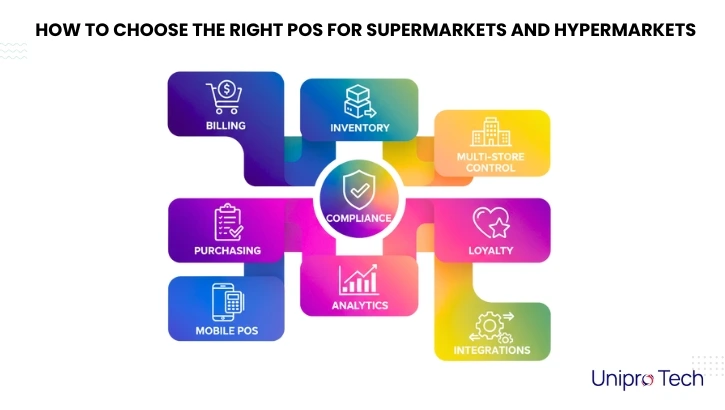
4. How to Choose the Right POS for Supermarkets and Hypermarkets

Best GST Billing Software for Retailers in India

Sections for infographic:

  • Billing
  • Inventory
  • Purchasing
  • Multi-store control
  • Compliance
  • Analytics
  • Loyalty
  • Mobile POS
  • Integrations

Visual style recommendation:
Clean layout, block-based design, soft colors, modern fonts.

5. Why Unipro Tech RetailPOS Is Ideal for Supermarkets and Hypermarkets

Unipro Tech’s RetailPOS solution is designed for large-format retail and offers:

  • High-speed billing
  • Real-time inventory
  • Multi-store management
  • Automated purchasing
  • Batch and expiry tracking
  • GST and e-invoice
  • Mobile POS
  • Full offline billing
  • Smart dashboards and analytics
  • Seamless integrations

It is perfect for supermarkets, hypermarkets, grocery chains, FMCG stores, and convenience stores.

6. Conclusion

Choosing the right POS system can transform your supermarket or hypermarket operations.
Focus on features that improve billing, inventory, reporting, and purchasing.
A modern POS helps you scale, manage branches efficiently, and enhance customer experience.

Frequently Asked Questions

Supermarkets and hypermarkets need a POS with fast billing, real-time inventory, offline support, and multi-store management. A system like RetailPOS with advanced analytics, purchase automation, and GST compliance is ideal for large retail formats.

Choose a POS that offers fast checkout, barcode and weighing scale support, centralized inventory, automated purchasing, GST billing, offline mode, and integrations with ERP, e-commerce, and payment gateways. These features ensure smooth supermarket operations.

A hypermarket POS must provide high-speed billing, multi-counter support, category-level inventory tracking, expiry and batch management, vendor management, and advanced reporting. Mobile POS and multi-store control are crucial for large-format retail.

POS pricing varies based on features like billing modules, inventory management, integrations, and number of stores. Most supermarket POS systems use subscription-based licensing. It’s best to request a demo and pricing quote to understand your store’s exact requirements.

Yes. Modern retail POS software provides real-time inventory tracking, low-stock alerts, automated purchase orders, stock transfers, audits, and expiry tracking — all essential for high-volume retail like supermarkets and hypermarkets.

Yes. A good POS system offers centralized pricing, centralized inventory, combined reporting, role-based access, and branch-wise performance insights. This helps multi-store supermarkets and hypermarkets scale efficiently.

How to Choose the Right POS System for Your Supermarket or Hypermarket Read More »

Why Modern Supermarkets Need Cloud Based POS and Inventory Software

Modern Supermarkets Need Cloud Based POS and Inventory Software

The supermarket and hypermarket industry in India is changing fast. Customers expect quick billing, real time stock availability, digital payments, and consistency across every branch. Traditional billing systems cannot keep up with these demands.

That is why modern retailers are shifting to cloud based POS and inventory software. It gives supermarkets the speed, accuracy, and control needed to run multiple stores efficiently, while delivering a seamless customer experience every day.

This guide explains why cloud POS has become essential for supermarkets, mini marts, hypermarkets, and FMCG stores.

Key Reasons Supermarkets Are Switching to Cloud POS

Faster Billing and Smooth Checkout

Cloud POS supports barcode scanning, rapid item search, multiple billing counters, and integrated weighing scale support to minimize queues and improve customer experience.

Live Inventory Tracking and Stock Accuracy

Supermarkets handle thousands of SKUs. Live stock tracking, automated reordering, and pilferage control help maintain accurate inventory and reduce revenue leakage.

Better Control Over Multiple Outlets

Centralized management lets retailers view sales, stock flow, pricing, and staff activity across all branches in real time.

Automated GST Compliance

GST rates, HSN mapping, invoice formatting, and statutory reports are automated for error free tax filing and compliance.

Business Insights and Analytics Anywhere

Owners can track store performance, fast moving products, category wise trends, and staff productivity directly on laptop or mobile dashboards.

Scalability for Expanding Retail Chains

Cloud POS grows with the business. Easily add new stores, counters, devices, and user roles without additional hardware or technical complexity.

Why Cloud Based POS Matters Today

A cloud POS system allows supermarkets to monitor billing, sales, stock, and staff performance across all branches from one dashboard. It works in real time, so you always see updated data.

Key advantages include:

  • Real time inventory movement and stock transfers

  • Central pricing and promotion control

  • Cloud backups for secure data

  • Live sales visibility across outlets

  • Faster store setup and scaling

With cloud technology, retailers do not worry about local server failures or outdated data. It ensures smooth operations, even during peak hours

Cloud POS vs Traditional POS

FeatureCloud-Based POSTraditional POS
AccessibilityAccess from any deviceOnly at store
Inventory ControlLive multi store trackingLocal limited view
Data BackupAuto cloud backupHigher data loss risk
UpdatesAutomaticManual updates needed
AnalyticsReal time dashboardsBasic reporting

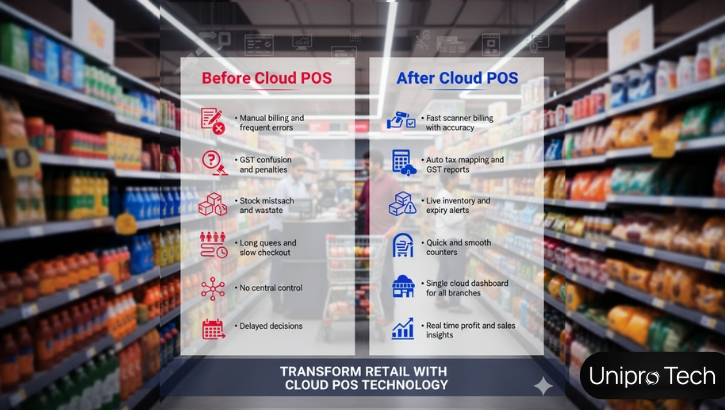
Before and After Using Cloud POS

Why Cloud POS Fits a Multi Outlet Retail Strategy

A growing supermarket chain requires centralized control. Cloud POS gives exactly that:

  • Manage all outlets from a single admin panel

  • Standardize billing, pricing, and promotions

  • Move inventory between branches with visibility

  • Compare store performance quickly

  • Add new outlets without IT complexity

Whether operating two stores or twenty, cloud POS keeps everything in sync.

Seamless Digital Payments and Loyalty Integration

Modern consumers prefer digital and contactless payments. Cloud POS systems support UPI, cards, wallets, and online pay seamlessly.

Retailers benefit from:

  • Faster checkout without manual entry

  • Automatic loyalty point calculation

  • Digital receipts and SMS updates

  • Easier reconciliation and reports

This drives repeat customers, increases average spending, and keeps payment tracking clean and transparent.

How Unipro Tech Helps Supermarket Chains

Unipro Tech Solutions delivers a complete supermarket POS and inventory platform built specifically for high volume retail. It includes cloud billing, fast barcode POS, GST automation, and centralized control.

Many leading supermarkets and mini marts in South India leverage Unipro Tech Solutions to manage peaks, maximize accuracy, and run their stores with ease. From billing counters to warehouse management and CRM, the system supports every part of the retail workflow.

Conclusion

Cloud based POS and inventory management is now essential for supermarkets and hypermarkets in India. With real time stock visibility, quick billing, GST compliance, multi outlet control, and digital payment integration, retailers can operate faster, smarter, and more efficiently.

The future belongs to organized, automated retail. Supermarkets that invest in cloud POS today will lead in customer satisfaction, operational efficiency, and business growth tomorrow.

Move Forward With Cloud Retail Technology

Begin your supermarket transformation today with a modern POS and cloud platform built for scale, speed, and accuracy.

Take the Next Step

Unipro Tech Solutions

Smart POS and cloud systems for supermarkets and hypermarkets

Website:www.uniprotech.co.in
Phone:044-421 421 40

Email:salesenquiry@uniprotech.co.in

Frequently Asked Auestions

The best cloud POS for supermarkets is the one that offers fast billing, multi-store inventory control, GST-ready invoicing, digital payments, and centralized reporting. Look for features like barcode billing, expiry tracking, and live stock updates. Cloud systems like Unipro Tech Solutions are trusted by many growing supermarkets in South India for speed and retail accuracy.

Traditional POS systems cannot support modern retail needs like real-time stock updates, multi-outlet control, and automatic data backup. Cloud POS gives supermarkets live reporting, centralized pricing control, fast billing, and online data access  essential for scaling and competitive customer service.

Yes. Cloud POS is built for multi-outlet retail. It allows supermarkets to manage pricing, stock transfers, promotions, and reports across all branches from one dashboard. Managers and owners can access live sales and stock data anytime, anywhere.

Cloud POS uses encrypted servers and automated backup systems like Amazon S3 to secure POS data. It protects against data loss from hardware failure, theft, or system crashes. This ensures supermarket operations continue smoothly without interruptions.

Cloud POS ensures GST accuracy through automatic HSN mapping, tax calculations, GST-bill formats, and ready-to-file GST reports like GSTR-1 and GSTR-3B. This reduces compliance errors and saves time during monthly filing.

Yes. Most advanced cloud POS systems include offline billing mode  allowing supermarkets to continue billing during internet interruptions. Once the connection returns, all data syncs automatically without manual work.

Smart POS and Cloud Systems for Supermarkets and Hypermarkets

Why Modern Supermarkets Need Cloud Based POS and Inventory Software Read More »